
Linux applet for Obsidian
VaultQuick Desktop
Tasks from your Obsidian vault (TaskNotes) right on the MATE panel in Linux.
What it is
Obsidian is a popular note-taking app that keeps everything in plain Markdown files in a folder on your device – your vault. With the TaskNotes plugin every task is a separate note with a due date, status and project.
VaultQuick Desktop puts those tasks on the panel of the MATE desktop (Linux Mint MATE, Ubuntu MATE…). The panel shows how many tasks are due today or overdue, and one click opens the agenda. It is the desktop sibling of the VaultQuick Android app.
What it does
Count on the panel
The number of today's and overdue tasks is always in sight, optionally with the project's icon.
Agenda in one click
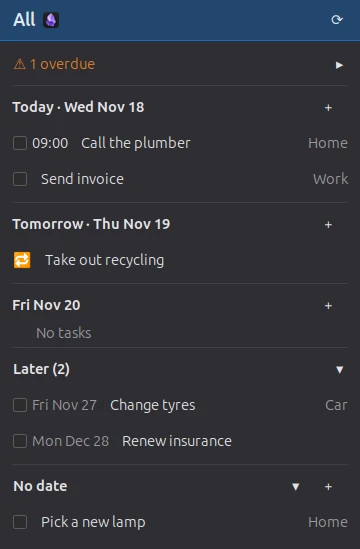
Overdue tasks, today, the next few days, later due dates and tasks without a date in one window.
Check off and add
Complete a task with its checkbox, add one to any day with +, edit it in a form or open the note in Obsidian.
One per project
Add several instances to the panel – one for all tasks and others for Work or Home, each with its own settings.
Keyboard shortcut
Open and close the window with e.g. Super+T, without reaching for the mouse.
Free and open
Open source under the MIT licence. It works directly with the files in your vault – Obsidian doesn't need to be running and nothing is sent anywhere.
Get started
- Download
vaultquick-desktop_…_all.debfrom the latest release on GitHub and open it with a double-click (on Linux Mint, Ubuntu or Debian). - Log out and back in, then right-click the panel → Add to Panel… → VaultQuick Tasks.
- Click the applet and choose your Obsidian vault with Choose vault….
You need the MATE desktop and a vault with the TaskNotes plugin. Installing from source, preferences and the keyboard shortcut are described in the README on GitHub.
Obsidian is a trademark of Dynalist Inc. VaultQuick Desktop is an independent app and is not officially affiliated with Obsidian.